
Find a Machine | Custom Phone Cases | By the VendingFinder Team | August 2026
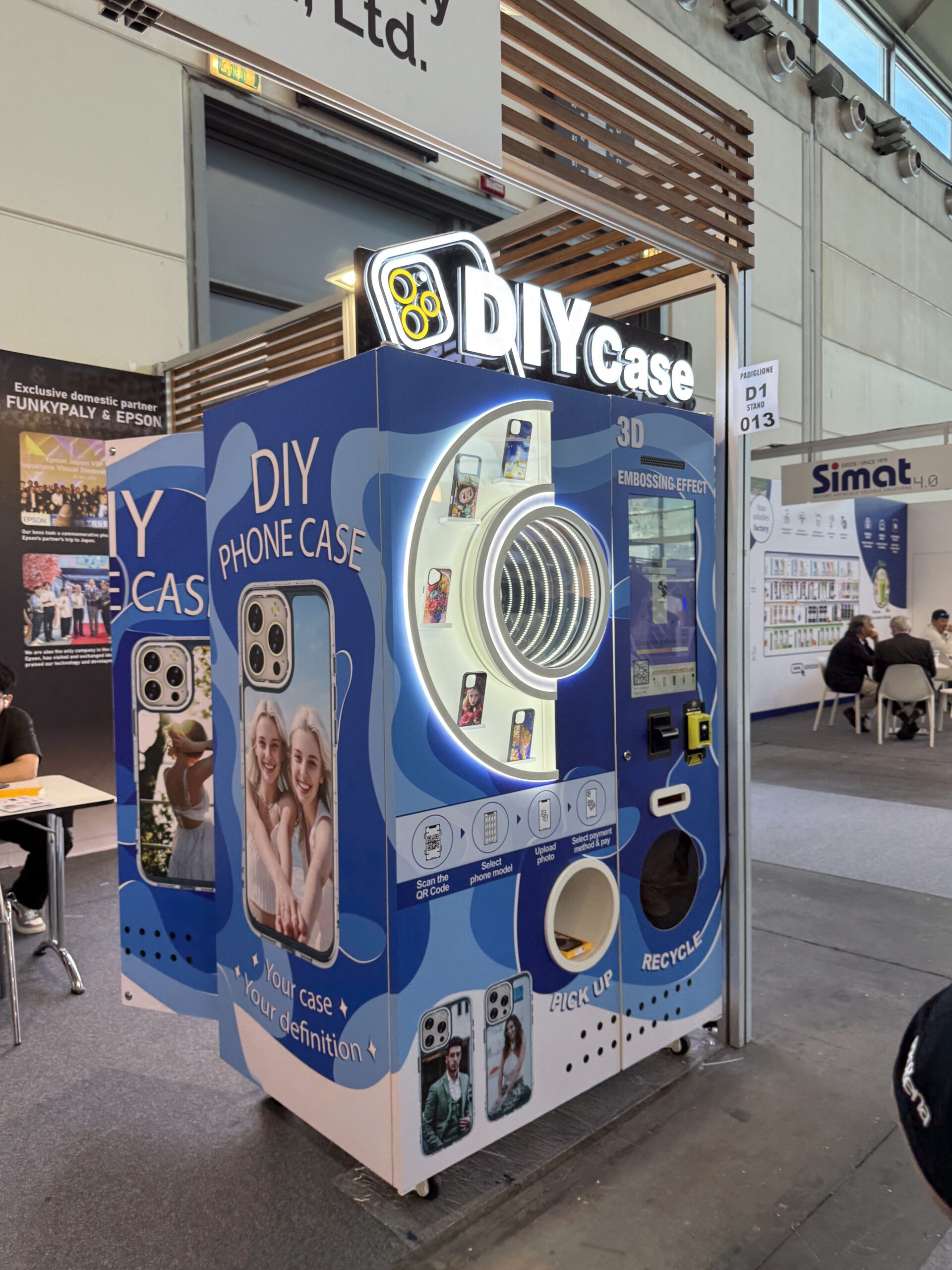
You have seen the video by now. Somebody walks up to a machine, scans a code, picks a photo off their phone, and a few minutes later walks away holding a phone case with that exact picture printed on it. Then you thought the completely reasonable thing, which is fine, but where do I actually find one of those.
And that turns out to be a much harder question than it should be. These machines are still genuinely rare in the United States, they are not listed anywhere obvious, they sometimes move, and searching for them the way you would search for a coffee shop mostly returns nothing useful.
So here is everything we know about tracking one down, what to do before you go, and how to make sure the case you walk away with is one you actually like.
Why These Are So Annoying to Find
Worth understanding, because it explains why your searches have not worked and points at what does work instead.
- Nobody agrees what to call them. Custom phone case machine, DIY case kiosk, photo case printer, phone case vending machine. There is no settled term, so searching one phrase misses everything listed under the others.
- They are usually inside somewhere else. A machine in a mall is not a business with its own listing. It sits inside a venue that has its own name, address and opening hours, and the machine itself is invisible to most map services.
- Some of them move. A fair number work events and conventions rather than sitting still, so a machine somebody saw last month genuinely might not be there now.
- Operators are small. Many run one or two machines and have no website, no listing, and no interest in being findable. They rely entirely on people walking past.
- The category is young in the US. These have been common in parts of Europe and Asia for years and are only now spreading here, which means coverage is patchy and concentrated in bigger cities.
Start With the Map
The fastest route is our live machine map, because it is built for exactly this problem. Machines are tracked individually rather than as part of whatever venue they happen to sit in, so you can see what is near you rather than guessing which mall might have one.
A few things worth doing while you are there rather than just glancing at the pins:
- Open the individual listing. Every machine has its own machine page with what it does, where exactly it sits inside the building, and how people have rated it.
- Check whether anyone has reported it broken. This is the single most useful thing on the page. Driving across town to find an out of order machine is a genuinely irritating afternoon.
- Read the rating. Print quality varies more between operators than people expect, and other visitors will tell you plainly whether a machine is any good. Our scoring system explains what those numbers mean.
- Note the exact position. Upper floor, near the food court, by the west entrance. Big venues are big, and this saves twenty minutes of wandering.
Where These Machines Usually Live
If you are searching manually, it helps enormously to know the logic operators use. These machines take a few minutes to print, so they get placed where people already have time to spare. Nobody puts one where you are rushing.
In rough order of how likely you are to find one:
- Shopping malls. By some distance the most common. Look near seating areas, the food court and the main atrium rather than by the entrances, since operators want people who are settled rather than arriving.
- Tourist attractions and visitor centres. Increasingly common and a genuinely good place to use one, because you have just taken photos of somewhere memorable. A case with your own picture of the place beats anything in the gift shop.
- Theme parks, zoos and aquariums. Usually near the exit or the central plaza, alongside the other souvenir options. Family venues have been quick to adopt these.
- Airports, after security. Check the main concourse and the larger gate lounges. Almost always on the departures side, since that is where people wait.
- Cinemas and entertainment complexes. Lobby areas, aimed at the fifteen minutes people spend waiting before a screening.
- University campuses. Student unions and main social buildings. Often quiet over the summer, so term time is your best bet.
- Phone repair shops and electronics stores. A smart placement that more operators are trying, because people waiting for a repair have both time and a reason to want a new case.
- Resort hotels and holiday parks. Lobby or activity areas, aimed at guests with holiday photos and a rainy afternoon.
- Big events and conventions. These are temporary, so if you see one at an event, use it then. It will not be there next week.
Quickest trick in a big venue: ask at the information desk instead of wandering. Mall staff know every kiosk and machine in the building because they get asked about them constantly, and they will point you straight there in ten seconds.
Searching Online, Properly
Most people try one search, get nothing, and conclude there are none nearby. Usually there is one, it is just not indexed the way they expected. Things that genuinely work:
- Search social media by location, not just maps. This is the big one. These machines get filmed constantly, and a location tagged video is often the only public evidence that a machine exists at all. Search your city name alongside the various terms and scroll.
- Try every name for them. Custom phone case machine, phone case printing kiosk, DIY case machine, photo case printer, personalised case vending. Different operators describe them completely differently.
- Search the venue rather than the machine. Look up your local mall, aquarium or cinema and check their news, events or directory pages. Venues frequently announce a new attraction even when the operator does not.
- Check local community groups. Somebody in your town has almost certainly already asked this question, and somebody has almost certainly already answered it.
- Look at nearby cities too. Because there are so few, people do travel for these, and an hour’s drive to a machine with good reviews is often better than a local one with poor ones.
Do This Before You Go
Five minutes of preparation makes a real difference to what you walk away with, because the machine can only print what you give it. This is where most disappointing results come from, and every one of them is avoidable.
- Know your exact phone model. Not just the brand, and not just roughly. Check it in your settings if you are unsure, because the machine needs to pick the correct blank case and a near miss will not fit properly. Models with slightly different camera layouts are the usual culprit.
- Choose your photo in advance. Scrolling through four thousand pictures while somebody waits behind you is nobody’s favourite experience. Pick two or three candidates and favourite them before you leave.
- Use a high resolution original. This matters more than anything else on this list. A photo straight from your camera prints beautifully. A screenshot, a heavily compressed download, or something saved from a messaging app will look soft and slightly muddy, and you will not be able to tell until it is printed.
- Think about the crop. The camera cutout takes a real bite out of the design, and the edges wrap around. Avoid putting a face, or the most important part of the picture, right where the camera hole lands. Busy patterns and landscapes handle this far better than tight portraits.
- Consider contrast. Very dark photos can print flat, and very light ones can wash out. An image with clear contrast between light and dark areas usually reproduces best.
- Check your signal. The whole process usually runs through your own phone, so a dead spot in a basement food court is a genuine problem. If you have no bars, move a few feet before you start.
- Allow the time. It prints while you wait, so do not start one as your flight begins boarding or as the trailers start.
What Actually Happens at the Machine
If you have never used one, the flow is simpler than it looks from outside. Most work roughly like this:
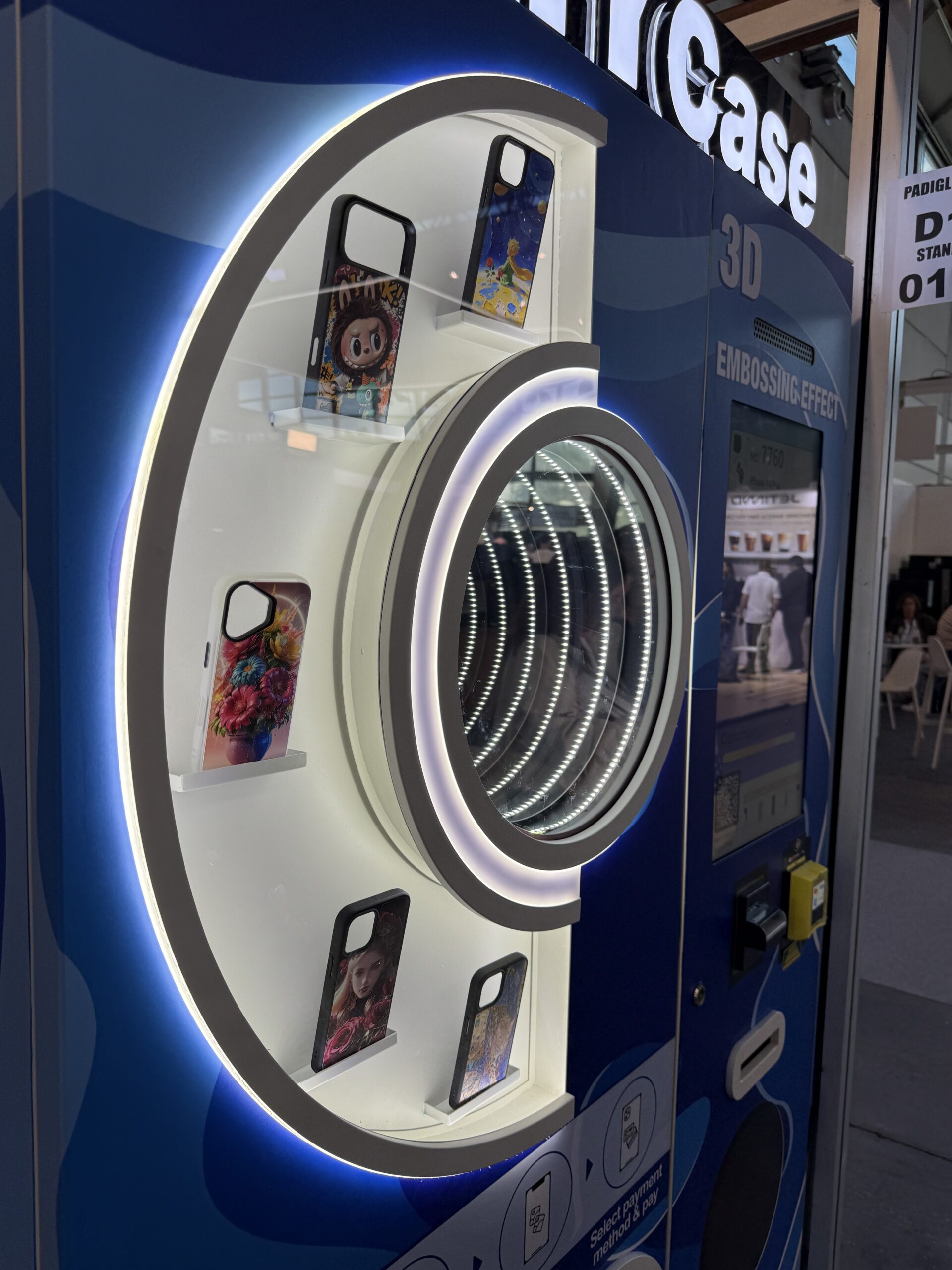
- Scan the QR code with your phone camera. No app to download and no account to create on most machines. The whole thing opens in your browser.
- Pick your phone model from a list. This is where knowing the exact model pays off.
- Upload your photo. Straight from your camera roll. You will usually get to position and crop it, so take a moment here rather than accepting the default.
- Preview it. Look properly at this screen. It shows where the camera hole falls and how the image wraps. This is your last chance to change your mind and it costs nothing.
- Pay. Card or mobile wallet on most machines. Some take cash but do not count on it.
- Wait and collect. The screen shows an order number while it prints, then the finished case drops into the pickup hatch. Do not walk off during the print.
Some machines offer a raised or embossed finish rather than a flat print, which gives the design a slight texture you can feel. If that option appears, it usually looks noticeably better on photographs with strong shapes and worse on very fine detail.
How to Judge a Machine Before You Pay
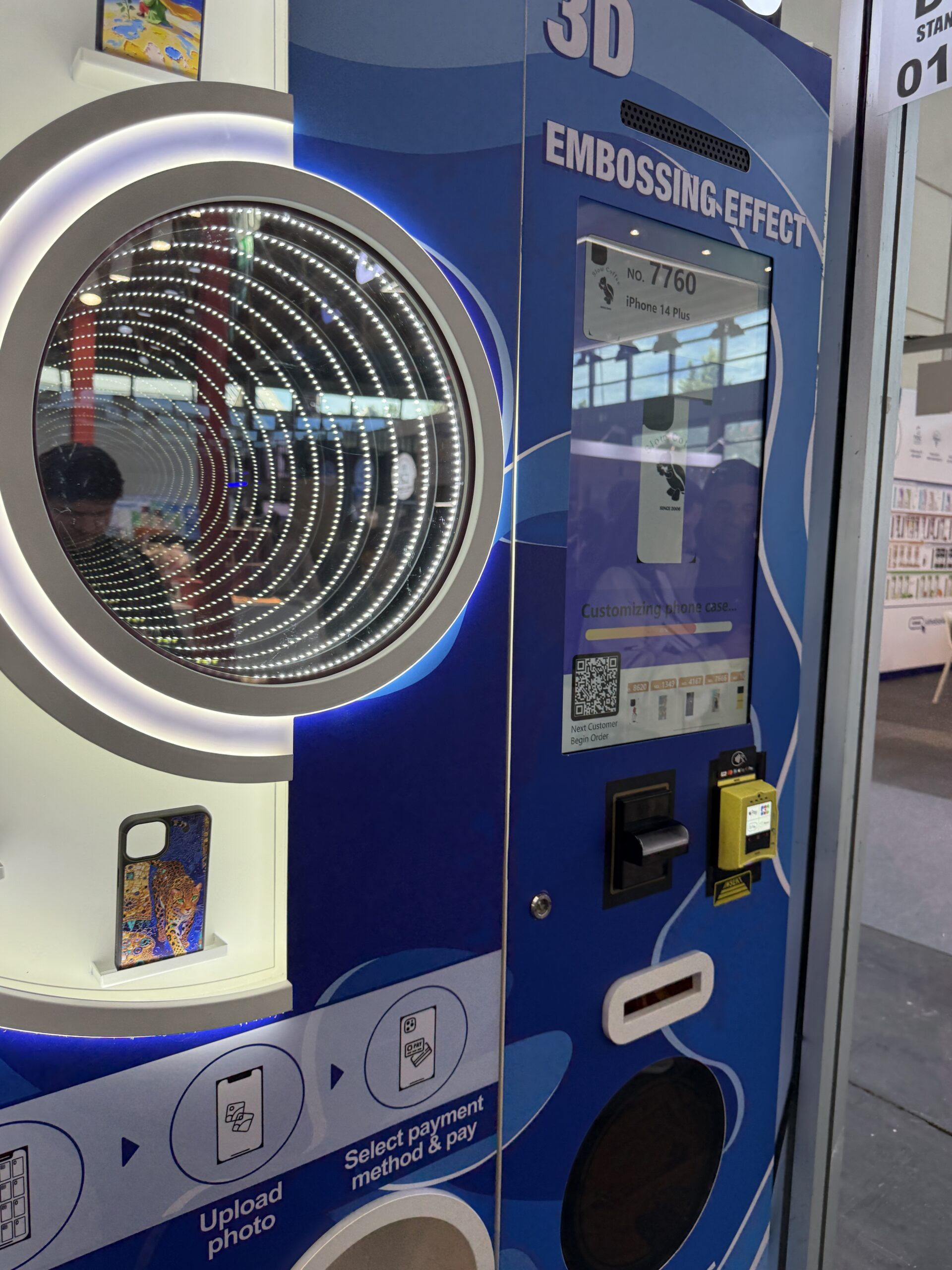
Quality varies between operators, and the samples on the front tell you most of what you need to know if you actually look at them rather than glancing.
- Are the colours strong or slightly faded? Faded samples usually mean ink that needs changing.
- Is fine detail sharp? Look at any text or small patterns in the samples.
- Does the print reach the edges cleanly, or is there an obvious unprinted margin?
- Do the samples look recent? Sun bleached, dusty samples suggest a machine nobody has visited in a while.
- Is the machine itself clean and lit? A well maintained exterior generally means a well maintained printer.
Use Photos You Actually Own
Worth saying plainly. Upload pictures you took yourself, or images you genuinely have permission to use. Grabbing a cartoon character, a band logo, a movie still or somebody else’s photograph off the internet puts both you and the operator in an awkward position, and a growing number of machines now screen uploads automatically and will simply decline the order.
Honestly, your own photos make far better cases anyway. The entire appeal of these machines is walking away with something nobody else on earth has, and a downloaded image gives you a worse version of something you could buy in any phone shop.
If Something Goes Wrong
It is rare, but these are printers and printers occasionally misbehave. What to do:
- Look for a support number on the machine. Most operators put one on the front, and many will sort a reprint or refund directly.
- Keep your order number and payment confirmation. Photograph the screen if you need to. It makes any follow up straightforward.
- Tell venue staff. They may not own the machine but they can usually contact whoever does, and they want to know if something in their building is broken.
- Report it on the map. Marking a machine as out of order saves the next person a wasted trip, which is the whole point of the thing.
Found One? Add It.
Here is the honest reason these machines are hard to find. Nobody has been keeping track of them. There is no official register, operators are small and scattered, and the only real record of most machines is a video somebody posted once.
So if you come across one, add it to the map and rate it. It takes about a minute, and it means the next person searching from your town gets an actual answer rather than a dead end. Note where it is inside the venue, whether it was working, and what the print quality was like, since those three things are exactly what the next person needs.
If you want to understand how ratings work and why some listings look more reliable than others, The Score explains it, and you can read more about what we are building on our about page.
Want One Where You Live?
If your town has none, that is not permanent. These machines are spreading quickly across the country and operators are actively hunting for good locations, particularly places with plenty of foot traffic and somewhere comfortable to wait.
If you run or manage a venue with the right kind of traffic, a mall, an attraction, a cinema, a campus or a busy visitor centre, you can put yourself forward on our for locations page. Operators are genuinely looking, and a good site is worth more to them than you might assume.
And if reading all this has made you think about running machines yourself rather than just finding them, the for operators page is where to start.
Frequently Asked Questions
How do I find a phone case printing machine near me?
Check the live map first, since that is the only place these are tracked individually rather than being hidden inside whatever venue they sit in. Failing that, look in shopping malls, tourist attractions, theme parks, airports after security and cinema lobbies, and search social media by location, because most public records of these machines are videos people posted.
How long does it take to print a case?
Usually a few minutes rather than seconds, because the machine is genuinely printing your image onto a blank case rather than dispensing something already made. Plan for a short wait rather than treating it like grabbing a drink, and do not start one if you are about to board a flight.
Will it have a case for my phone?
Most machines cover the popular current models and several generations back, but coverage varies by operator and older or less common handsets are sometimes missing. Check the machine listing beforehand if you can, and know your exact model rather than just the brand, since similar looking phones often need different cases.
What kind of photo works best?
A high resolution original taken on your own camera. Screenshots and compressed downloads print soft and slightly muddy. Keep the important part of the image away from the camera cutout and the edges, and pictures with clear contrast generally reproduce better than very dark or very pale ones.
Do I need to download an app?
Usually not. Most machines work by scanning a QR code that opens everything in your phone browser, with no app and no account needed. You will need a decent signal though, since your photo uploads from your handset rather than from the machine.
Can I print any image I want?
Use photos you took or images you have permission to use. Copyrighted material such as cartoon characters, logos and movie stills causes problems for both you and the operator, and many machines now screen uploads and will refuse the order. Your own photos also produce a far better result, since the whole point is having something unique.
Find One Near You
Search the live map for custom print machines and everything else, see which ones are actually working, and add any machine you find so the next person does not have to hunt for it.